
Crossing Words Rules: How to Play
Crossing Words is a newspaper-style crossword for the whole room. Race everyone on the same puzzle, each on your own board, or share one board and earn the words you finish first.
What you need
A phone, tablet or computer with a browser. Each player uses their own device, and the game brings its own keyboard, so the phone’s keyboard never covers the board.
One player is enough. Solve alone, race or solve with bots, or play with friends. There are no turns: everyone types at once.
The puzzles
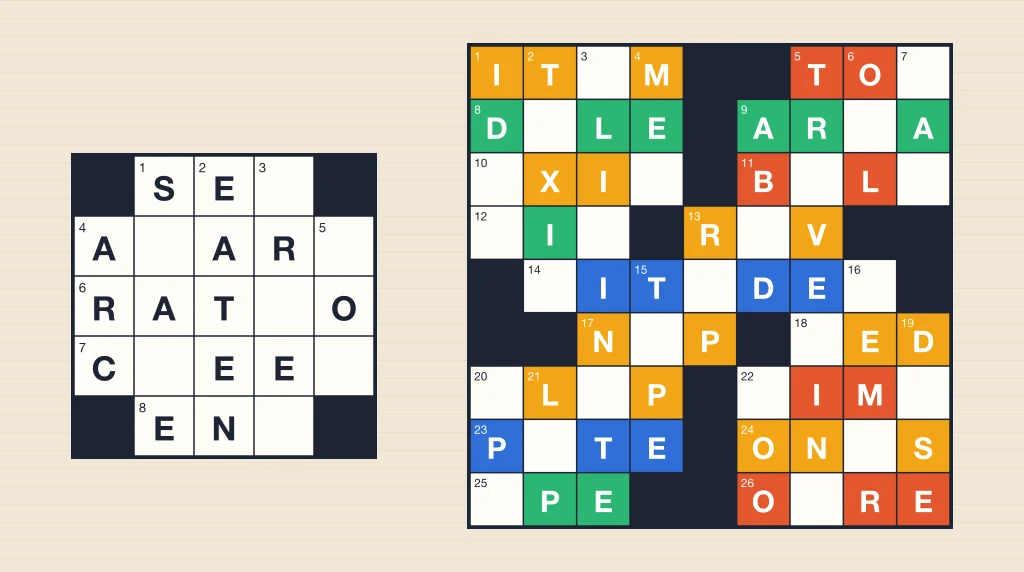
Every puzzle is a newspaper-style crossword. The black squares make the same pattern turned upside down, every white square is in both an across word and a down word, and no word is shorter than three letters.
The squares that start a word are numbered, and each word has a clue: an Across list and a Down list.
The puzzles and their clues are written for the game, not copied from anywhere else. The host’s phone remembers the puzzles it has dealt and picks one it has not seen recently.
Sizes
The host picks one of four sizes. The two smaller sizes have easier clues.
- Mini: 5 × 5, a few minutes.
- Small: 7 × 7.
- Midi: 9 × 9.
- Large: 11 × 11, the longest solve.
Two ways to play
- Race: everyone gets the same puzzle on a board of their own. A perfect board beats any board with a mistake, and the fastest perfect board wins.
- Together: the room shares one board. The first player whose letter finishes a word right earns its squares, and the most squares wins.
Setting up
- Host a room and share the room code, or play on your own.
- Add bots in the lobby if you want them.
- Start the game. Everyone gathers on the game screen.
- The host picks Race or Together, and a size, then taps Start.
- Everyone on the game screen gets the puzzle, bots included, and the clock starts.
Filling in the grid
Tap a square and type. The highlighted word is the one you are typing in, and its clue sits in the bar above the keyboard.
Each letter moves you to the next empty square of the word. Once a word is full, you go on to the next word that still has a gap.
Tap the same square again to turn between across and down. Tap the clue bar to turn too, or the arrows beside it to move to the next or previous clue.
The delete key clears the square you are on, or, if it is already empty, the one before it.
On a wide screen, the Across and Down lists sit beside the grid. Tap any clue in them to go to it.
Nothing is marked right or wrong
Like a crossword on paper, nothing tells you a letter is right while you play. There are no red letters, no Check button and no Reveal. A full board looks the same whether it is right or not.
You know you are close when every word crosses cleanly: each across word and each down word reads as an answer to its clue.
Undo
Undo my last letter takes back your own last change, a letter typed or a square cleared, one at a time, and puts you back where you were. It works the same whether the letter was right or not.
In Together it only ever takes back your own letters. If someone else has written over one of yours since, that one is skipped, so your undo never removes another player’s letter.
Undo is off once you have tapped Done.
Done, and the check
When you think the board is finished, tap Done (We’re done, in Together). Tap it again to take it back if you spot something. While you are Done, the keyboard is off.
The boards are checked once every player still in the game has tapped Done. Then the answers show, and the final screen ranks everyone.
A phone that is put down or goes to sleep keeps its place for two minutes. The game waits for it, and shows who it is waiting for. After two minutes away, the check goes ahead without them. A player who goes back to the lobby is not waited for at all.
If you have notifications turned on, and everyone else is done while you are away, your phone gets a notification once.
Race
Everyone gets the same puzzle, each on a board of their own. Nobody else can see your letters: the players along the top show only which squares each racer has filled, and how much of the board that is.
Your clock runs from the start. Tapping Done stops your time; taking Done back starts it again.
The time limit
With more than one racer, bots included, a race has a time limit. When it runs out, every board is checked as it stands, and anyone who has not tapped Done is timed at the limit. The clock shows the time left during the last minute.
- Mini: 5 minutes.
- Small: 10 minutes.
- Midi: 20 minutes.
- Large: 30 minutes.
Who wins a race
- A perfect board, every square right, beats any board with a mistake.
- Perfect boards rank by time: the fastest wins.
- Boards with mistakes rank by how many squares are right, then by time.
- The final screen shows everyone’s place, and your own board with every wrong or empty square marked and its right letter shown.
Together
The room shares one board. Anyone can type in any square, wrong letters included, and anyone can change anyone’s letter. If two players type in the same square, the later letter stays.
Each letter is faintly tinted in the color of whoever wrote it, so you can see who is working where. The tint says nothing about right or wrong.
Earning words
- When your letter is the one that makes a word right, and nobody has finished that word before, you earn the word.
- Earning a word gives you every square in it that has not already been earned through a word crossing it. A word whose squares were all earned already gives you nothing.
- One letter can finish an across word and a down word at once. You earn both.
- Credit never moves. If a word is broken later and someone puts it right again, the first player to finish it keeps it.
- Who has earned what stays secret until the check, so typing letters at random tells you nothing.
Who wins Together
- At the check, only words that are still right count. A word you earned that is wrong on the final board earns you nothing, and its squares can go to whoever earned a right word crossing it.
- The most squares wins.
- A tie goes to whoever earned their squares sooner on average, then to whoever earned their first word first.
- The final screen shows the finished board with every square in the color of the player who earned it. Wrong or empty squares are marked, with the right letter shown. Tap a player to light up their words.
Picking a puzzle back up
- On your own, a race needs no rush: with nobody else racing there is no time limit. Close it, and the phone keeps the puzzle, your letters and your time. The clock waits. Next time, Pick up where you left off.
- A Together board is kept on the host’s phone as it changes: the letters, who wrote them, and the words earned. Next time that host picks Together, they can pick the saved board back up. Players get their own words back, and words earned by anyone who does not come back still count for them.
- Starting a new puzzle replaces the saved one. For a saved Together board, the game asks first.
- A race with other people is timed, so it is never saved to pick up later.
Every rule and edge case
- Ending early: in a room with others, the host can tap End to check the boards as they stand.
- Pause: the pause button, or Escape on a computer, stops the game and the clock for everyone.
- Someone’s phone drops: in a race, their letters are still there when they come back, and their clock has kept running. In Together, their letters stay on the board.
- A late joiner: someone who arrives after the start plays the same puzzle on the same clock.
- The host’s phone drops: another phone in the room takes over and the puzzle carries on.
- The host leaves the game with ×: the game ends for everyone.
- Play again: after the check, the host can pick a new mode and size.
Bots
In a race, a bot fills its own board at a pace set by its level, fast at first and slower on the last squares, and taps Done a few seconds after its board is full. Sometimes it leaves a wrong square or two: Easy bots often, Hard bots rarely. A Hard bot on a Mini takes about a minute.
In Together, bots type into the shared board. Each picks a word, most likely one with some letters already in, thinks, and types it. Easy bots think longest and get the most words wrong; Hard bots are quickest and nearly always right. Once the board is full they look for wrong words to fix, and tap Done when they find nothing more. A bot’s wrong letters can be fixed by anyone, and bots earn words by the same rules as everyone else.
Playing solo
Host a room on your own and start. Race on your own has no time limit, and the puzzle can be put down and picked up later. Add bots in the lobby to race them, or to solve a Together board with them and see who earns the most.
Playing with friends anywhere
Host a room and send the room code or invite link. Friends open it on their own phones, wherever they are. In a race everyone sees how far along the others are; in Together every letter shows on every phone as it is typed.
Playing as a party with a TV
Open joinme.games/watch on a TV or laptop and enter the room code. In a race, the big screen shows every racer’s board filling in, the squares only and never the letters, with the clock and who has tapped Done. In Together it shows the shared board large, letters live, each in its writer’s color. Then the check.
Players still type on their own phones. The TV only watches.
Controls
- Tap a square to type there. Tap it again to turn between across and down.
- Tap the clue to turn, or the arrows beside it for the next or previous clue.
- On a computer, type on your own keyboard: the arrows move, Tab or Enter goes to the next clue and Shift goes back, Space turns, Backspace deletes, and Ctrl or ⌘ Z undoes.
- The question mark shows the instructions.
Questions
- How do you play Crossing Words?
- Tap a square and type the answers to the clues. In Race, everyone solves the same puzzle on their own board and the fastest perfect board wins. In Together, everyone shares one board and the first to finish a word right earns its squares. Tap Done when you think you are finished.
- Does Crossing Words tell you when a letter is wrong?
- No. Nothing is marked right or wrong while you play. The boards are checked once everyone has tapped Done, and the final screen marks every wrong or empty square with its right letter.
- Can you do a crossword with friends online?
- Yes. Host a room and send the code. Friends join from their own phones, wherever they are. Race each other on the same puzzle, or solve one board together and see who earns the most words.
- What sizes are the crosswords?
- Mini is 5 × 5, Small 7 × 7, Midi 9 × 9 and Large 11 × 11. Mini and Small have easier clues.
- Is there a time limit?
- In a race with more than one player, bots included: 5 minutes for a Mini, 10 for a Small, 20 for a Midi and 30 for a Large. On your own there is none, and Together has none.
- Can I stop and finish a crossword later?
- Yes. On your own, the phone keeps your race, letters and time, and the clock waits. A Together board is kept on the host’s phone, to pick up next time they host it.
- Who gets the points in Together?
- Whoever types the letter that makes a word right first earns every square of it not already earned through a crossing word. At the check only words still right count, and the most squares wins.
Play Crossing Words
Race the same crossword, or solve one together and earn the words you finish.