
 Beta
Crossing Words
Race the same crossword, or solve one together and earn the words you finish.
In beta: sign in free to host; your room plays too. Compare accounts
- Party: As a party
- Online: With friends, from anywhere
- Solo: Solo, with bots
- 1Press Play
- 2Friends join by code
- 3Play together
A newspaper crossword
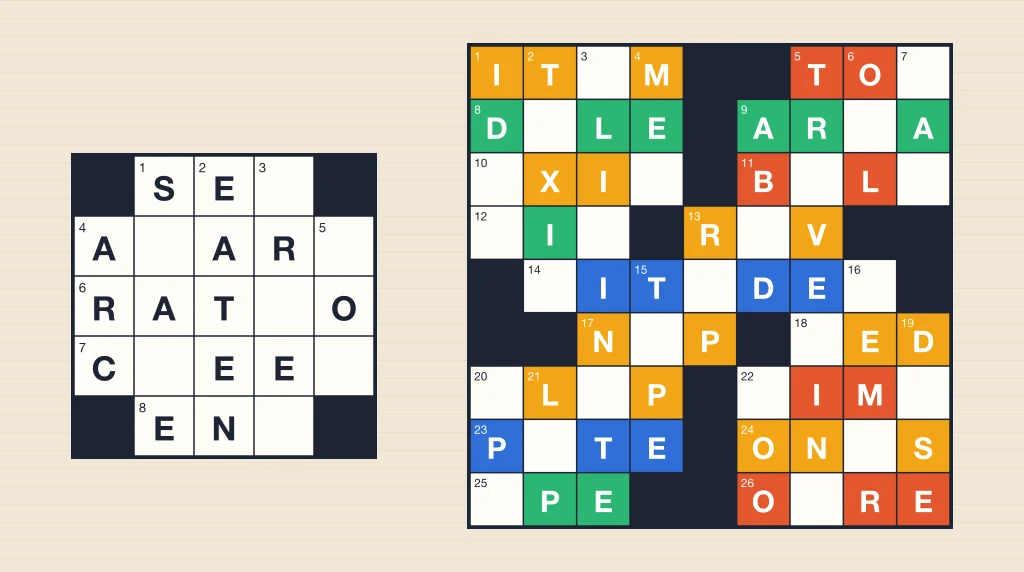
Four sizes, 5 × 5 to 11 × 11. Every square is in an across and a down word.
About Crossing Words
Crossing Words is a newspaper-style crossword: black squares in a pattern, every square in an across word and a down word, and a clue for each.
Race, and everyone gets the same puzzle on their own board. Nothing says a letter is right while you play. Tap Done when you think you have it, and once everyone has, the boards are checked: a perfect board beats any with a mistake, and the fastest perfect board wins.
Together, and the room shares one board. Anyone can type in any square, wrong letters included. The first player whose letter finishes a word right earns its squares, and at the end the board shows, in each player’s color, the squares they earned.
Pick a size: a Mini (5 × 5) for a quick one, a Small (7 × 7), a Midi (9 × 9), or a Large (11 × 11) for a longer solve. Put a puzzle down and pick it up later on the same phone.
How to play
- Tap a square and type. Tap it again to turn between across and down.
- Nothing says right or wrong while you play. Tap Done when you think the board is finished.
- Race: the same puzzle for everyone, and the fastest perfect board wins.
- Together: one board, and the first to finish a word right earns its squares.
The full rules of Crossing Words →How to win at Crossing Words →
Controls
- Type on the keyboard under the clue. On a computer, your own keyboard works too: arrows move, Tab goes to the next clue.
- Tap the clue to turn, or the arrows beside it to move through the clues.
- Undo takes back your own last letter, typed or cleared. On a computer, Ctrl or ⌘ Z does it too.
Playing with friends
- Sign in free with Google or Apple and press Play: you get a short game code for your group.
- Share the code or the invite link with your friends.
- Friends open it on their own phones and they are in.
- The host presses Play and everyone starts together.
- Put it on the TV if you like: any screen with a browser shows the game live. How to show it on your TV →
Questions
- Does it tell me when a letter is wrong?
- No. Like a crossword on paper, you know you are close when every word crosses cleanly. The boards are checked once everyone has tapped Done.
- Can I stop and finish a puzzle later?
- Yes. On your own, the phone keeps the puzzle and your letters, and the clock waits. A Together board is kept on the host’s phone, to pick up next time they host it.
- Do I need an account?
- To host it, yes: a free Google or Apple sign-in while Crossing Words is in beta. Everyone in your room plays without one, as a guest with a name picked for them. A guest lasts 24 hours. Your real name is never shown.
- Do I need to download anything?
- No. Every game runs in the browser on your phone, tablet or computer. Open joinme.games and play. You can add it to your home screen for an app-like experience.
- How do my friends join?
- Host a room and you get a short game code. Share the code or the invite link. Friends open it on their own phones and they are in the room straight away — nothing to press. The host starts the round for everyone.
- Does it work on iPhone and Android?
- Yes. Any modern phone browser works, and the same game runs on a laptop or a tablet. Everyone in a group can be on different devices.
- Is it free?
- Yes, with a free sign-in. Crossing Words is in beta: sign in with Google or Apple to host it, and everyone in your room plays too, with no account of their own. Once it leaves beta, nobody needs to sign in.